
Best ChatGPT Prompts for Cinematic Photo

AskSide
October 22, 2026
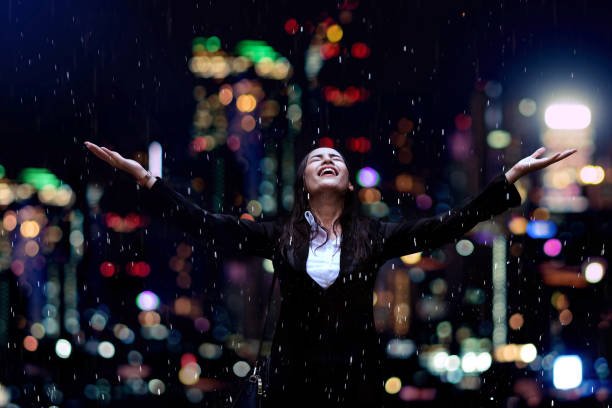
Using the best ChatGPT prompts for cinematic photo creation allows digital artists and photographers to generate hyper-realistic images that mimic the high-end look of professional film. This method focuses on lighting, depth of field, and color grading to produce a truly immersive visual experience for the viewer. By providing specific technical details through your instructions, you can turn a simple idea into a stunning masterpiece that looks exactly like a high-budget still from a blockbuster movie.
Mastering the art of prompt engineering is essential for anyone looking to push the boundaries of modern artificial intelligence and digital art. This comprehensive guide will provide you with the exact phrases and structural patterns needed to achieve world-class results across various AI image generation platforms.
These are the Best ChatGPT Prompts for Cinematic Photo
Creating a truly cinematic image requires a deep understanding of how light, lens choice, and composition work together to tell a story without words. When you use a specific ChatGPT prompt for cinematic photo generation, you are essentially acting as a director who is communicating with a high-level director of photography to set the stage. The following points cover various cinematic techniques, from the classic anamorphic wide shots to the intimate, grainy textures of vintage film stocks. By implementing these detailed examples, you will be able to guide the AI to focus on the nuances of shadows, reflections, and atmospheric conditions that distinguish a professional photograph from a casual snapshot. Let us explore the technical layers required to elevate your digital imagery to a cinematic standard.
1. Mastering the Anamorphic Wide-Screen Aesthetic
The anamorphic look is a hallmark of big-budget cinema, characterized by a wider aspect ratio and distinct horizontal lens flares. To achieve this, you should instruct the AI to use a 2.39:1 aspect ratio and describe the oval-shaped bokeh that is common with these specialized lenses. Mentioning specific flare colors, like a subtle blue or amber, can add to the realism of the shot. This technique is particularly effective for epic landscapes or cityscapes where you want to emphasize the scale and grandeur of the environment. The result is an image that feels much wider and more immersive than a standard square or vertical frame. It forces the AI to consider the edges of the frame and how light stretches across the horizontal plane.
Act as a professional cinematographer. Create a detailed prompt for a wide-angle anamorphic shot of a lone traveler standing on the edge of a futuristic desert canyon. Include details about 2.39:1 aspect ratio, blue horizontal lens flares, oval bokeh, and a sense of immense scale in the background.
2. Utilizing High-Contrast Chiaroscuro Lighting
Lighting is the most powerful tool in the cinematographer’s kit for creating mood and drama. The chiaroscuro technique uses strong contrasts between light and dark to give a sense of volume and three-dimensional depth to the subject. You should ask for a single, strong light source, such as a window or a spotlight, while keeping the rest of the scene in deep shadow. This creates a "noir" feeling that is perfect for character studies or mysterious plot-driven scenes. Describing how the light catches the dust particles in the air or the texture of the subject's skin adds a layer of tactile realism that makes the image pop. It is all about the interplay between what is visible and what remains hidden in the dark.
Describe a cinematic scene in a dimly lit 1940s detective office. Use chiaroscuro lighting where a single desk lamp creates sharp shadows and bright highlights. Focus on the light hitting the smoke from a cigarette and the textured patterns of the shadows on the wall.
3. Specifying Professional Camera Gear and Lens Settings
The best ChatGPT prompts for cinematic photo generation often include specific camera brands and lens focal lengths to trigger the AI's high-quality training data. Mentioning equipment like the Arri Alexa or the Red V-Raptor tells the AI to prioritize the color science and dynamic range associated with those elite systems. Furthermore, specifying a lens like a 35mm prime at f/1.8 helps define the depth of field, ensuring that the background has a smooth, creamy blur while the subject remains razor-sharp. This mimics the physical properties of light passing through high-end glass, making the final output look less like a digital generation and more like a real photograph. It adds a layer of professional credibility to every image you create.
Generate a prompt for a cinematic portrait of a woman in a rain-slicked neon city. Specify that the image should look as if it was shot on an Arri Alexa with a 35mm f/1.4 lens. Emphasize the shallow depth of field, the sharp focus on her eyes, and the beautiful blur of the city lights in the background.
4. Describing Advanced Color Grading and Palettes
The best prompt for ChatGPT for cinematic photo work must include a discussion of color science to set the emotional tone of the piece. You can ask for a classic "teal and orange" grade for a high-action look, or a desaturated, "bleach bypass" style for a gritty, war-film aesthetic. Mentioning specific tones in the shadows versus the highlights allows you to control the "temperature" of the image. For example, warm golden highlights combined with cool blue shadows create a sense of professional color balance that is common in modern Hollywood productions. This level of control ensures that the colors work to support the narrative rather than just being a random assortment of hues. It creates a cohesive visual identity for your digital work.
Create a prompt for a cinematic sunset scene on a rural farm. Specify a color palette of deep oranges and warm golds in the highlights, with cool teal and navy tones in the shadows. Ask for professional color grading that emphasizes the nostalgic and peaceful mood of the environment.
5. Focusing on Volumetric Lighting and Atmosphere
Atmosphere is the "secret sauce" of cinematic photography, as it provides a sense of physical space and air. By including terms like volumetric lighting, god rays, or heavy morning mist, you tell the AI to render the way light travels through a medium. This is particularly effective in forest scenes, old churches, or industrial warehouses where light beams are visible and distinct. This technique adds a layer of mystery and beauty that makes the environment feel like a character in its own right. It also helps to separate the foreground from the background, adding to the overall sense of depth. Without atmospheric details, images can often feel flat and overly clean, which is a common giveaway of AI-generated content.
Describe a cinematic interior of an ancient stone cathedral. Use volumetric lighting where sunbeams are visible through high stained-glass windows, illuminating dust motes in the air. Focus on the sense of height, the cool damp atmosphere, and the way the light hits the wooden pews.
6. Capturing Intense Emotional Portraits with Macro Details
Cinema often relies on tight close-ups to convey the internal emotions of a character. A ChatGPT prompt for cinematic photo should focus on micro-expressions, such as the glint in an eye, a single tear, or the subtle tension in a forehead. Ask for extreme detail in the skin texture, including pores and fine lines, to move away from the "plastic" look that some AI models produce. The framing should be tight, focusing entirely on the face to force the viewer to confront the subject's emotion directly. Using a 50mm or 85mm lens description here is ideal, as it provides a natural perspective that is similar to how the human eye sees a person in a close conversation. This creates a powerful connection between the subject and the audience.
Write a prompt for an intense cinematic close-up of an elderly man’s face. Focus on the deep wrinkles, the weathered texture of his skin, and the reflection of a distant fire in his pupils. The lighting should be soft but directional, highlighting his expressive features and a look of quiet wisdom.
7. Establishing Epic Scale in Wide Landscape Shots
Cinematic photos are not always about characters; sometimes the environment itself provides the drama. To capture an epic scale, you should use low camera angles and describe the relationship between a small foreground element and a massive background structure. This "David versus Goliath" composition is a classic way to create a sense of wonder and awe. Use terms like sweeping wide shot or bird's eye view to define the perspective. Mentioning geological features like jagged mountain peaks or massive crashing waves helps the AI understand the raw power of the scene. This approach is perfect for adventure or fantasy themes where the world-building is the primary focus of the visual story.
Generate a prompt for an epic cinematic landscape of a tiny castle perched on the peak of a massive, snowy mountain range. Use a low-angle wide shot to make the mountains look imposing. Describe the harsh sunlight reflecting off the snow and the deep, dark shadows of the valleys below.
8. Incorporating Motion Blur and Action Stills
A static image can still convey a sense of motion if the ChatGPT prompt for cinematic photo includes details about shutter speed. You can ask for a "fast shutter" to freeze a moment of intense action, like a car mid-jump, or a "slow shutter" to create a motion trail that suggests speed. This adds a sense of time and kinetic energy to the photograph. Describing the spray of dirt from a wheel or the blur of a busy street background creates a narrative of movement that keeps the viewer's eye engaged. It transitions the image from a simple still to a moment captured from an ongoing story. This technique is essential for sports, racing, or urban street photography themes.
Describe a cinematic action still of a motorcycle racing through a neon city at night. Specify a slight motion blur on the background and wheels to convey high speed, while the rider and the body of the bike remain in sharp focus. Include sparks flying from the pavement and reflections on the rider's helmet.
9. Simulating Historical Film Stocks and Grain
For a more nostalgic or gritty feel, you can ask the AI to mimic specific film stocks from the past. Mentioning Kodak Portra 400 for warm skin tones or Fujifilm Superia for cool greens adds a distinct character to the image. Furthermore, asking for a subtle film grain or "35mm film aesthetic" helps to break up the digital perfection of the AI's output. This makes the photo feel like it was found in an old archive or shot on a vintage camera, which adds a layer of soul and history to the work. You can even describe "light leaks" or "slight chromatic aberration" at the edges of the frame to simulate the charming imperfections of analog photography. This is a favorite technique for creators looking for a "vibe" rather than technical perfection.
Create a prompt for a cinematic 1970s street scene in New York. Specify that the image should have the look of Kodak Portra 400 film, with warm tones, subtle film grain, and a slight vintage haze. Focus on the fashion of the people and the classic cars in the background.
10. Mastering Nighttime Urban Cinematography
Nighttime urban scenes offer a unique opportunity to play with color and reflection. The key here is to focus on the variety of light sources, from neon signs to car headlights and the glow of shop windows. Ask for wet pavement or rainy streets to double the amount of light in the scene through reflections. This creates a dense, layered look that is visually rich and satisfying. The color palette can be quite diverse, using the contrast between the deep blacks of the night and the vibrant colors of the city. This style is often associated with the "cyberpunk" or "neo-noir" genres and is one of the most popular uses for AI image generation due to its striking visual impact.
Write a prompt for a cinematic night shot of a futuristic Tokyo alleyway in the rain. Describe the vibrant neon signs reflecting on the wet ground, the steam rising from a small ramen shop, and the deep shadows between the buildings. The overall mood should be mysterious and vibrant.
Things to Consider for Cinematic Photo Prompts
While using the best ChatGPT prompts for cinematic photo creation will give you a massive advantage, there are several nuances to keep in mind to ensure the highest quality output. Cinematic art is about the details that occur between the pixels, and understanding these factors will help you refine your results. Here are some critical points to consider when building your visual narratives with AI.
1. Lighting and Shadow Play: The most important aspect of a cinematic image is the light. You must be specific about where the light is coming from and how it affects the subject. Always describe the "key light" (main source), the "fill light" (reduces shadows), and the "back light" (separates subject from background). Using ChatGPT prompts for cinematic photo that mention these three points of lighting will consistently produce more professional and three-dimensional results compared to general descriptions.
2. Aspect Ratio and Composition: The shape of your image dictates how the story is perceived. A vertical 9:16 ratio is great for social media but rarely feels cinematic. Aim for wider ratios like 16:9 or 2.39:1 to give your photos a "movie screen" feel. Additionally, use composition rules like the "rule of thirds" or "leading lines" within your prompt to guide the AI's placement of objects. This ensures that the viewer’s eye is led through the image in a deliberate and artistic way.
3. Texture and Grain: AI can sometimes produce images that look too smooth or "perfect," which can feel artificial. To combat this, always include sensory details about textures. Mention the roughness of a brick wall, the soft fuzz of a sweater, or the cold sheen of polished metal. Adding a request for a "fine film grain" can help unify the image and give it a more grounded, organic quality that feels like it was captured on a physical medium.
4. Post-Processing Terminology: Using words from the world of digital editing can help the AI understand the final "look" you want. Terms like color grading, high dynamic range (HDR), vignettes, and sharpening are very useful. You are telling the AI not just what to see, but how the final "print" should look after it has been through a professional studio. This helps in achieving a specific mood, whether it is the bright clarity of a documentary or the moody darkness of a thriller.
5. Subject and Narrative: A cinematic photo should always feel like it is part of a larger story. Instead of just describing a person, describe what they are doing or what they are looking at. "A man sitting" is a subject; "A man staring at a fading letter in the dim light of a train station" is a cinematic story. Including these narrative elements gives the AI a reason to choose specific lighting and environmental details that match the emotional weight of the scene.
6. Ethical and Legal Constraints: Be aware that some AI models have restrictions on generating likenesses of real celebrities or copyrighted characters. Instead of asking for a specific actor, describe the "archetype" or the "vibe" of that actor. For example, instead of asking for a specific famous person, ask for "a rugged, middle-aged action hero with a stoic expression." This ensures your work remains original and avoids potential issues with platform policies or intellectual property rights.
Conclusion
Mastering the best ChatGPT prompts for cinematic photo generation is a journey of blending technical photography knowledge with creative storytelling. By using specific instructions for lighting, gear, and atmospheric conditions, you can produce visuals that rival the work of professional cinematographers. It is important to remember that the best ChatGPT prompts for cinematic photo results come from an iterative process where you refine your language based on the AI's output. Always prioritize the emotional narrative of your image and use the technical settings as tools to support that core story. With the right approach, you can bridge the gap between imagination and digital reality, creating a portfolio of images that are truly cinematic and memorable. Continue to experiment with different genres and historical styles to expand your artistic range and discover the full potential of artificial intelligence in the world of visual art.
Enjoyed this read?
Share it with your friends and colleagues.